
Computer Cores & Hacking
Computers in Afterverse are referred to as Cores. Cores cover everything from mainframes and servers down to smartphones and even small embedded devices. This chapter describes many of the ways to use, misuse, and abuse these systems.
Cores in Everyday Life
Cores are everywhere in most cultures you'll explore in Afterverse. Computers and cellphones have them, of course, but as technology advances, so do light bulbs, toasters, guns, door locks, powered armor, and your home's HVAC unit. The vast majority of connected devices are run by an Embedded Device or Secure ED Core, while most people have a Commlink or similar device.
Digital Macros
A Digital Macro is simply an action one can execute using a Core. Almost any command given to a Core will use one of these actions. Digital macros can be triggered in a few different ways depending on the available technology and equipment, and depending on the User Interface (UI) available. Unless otherwise stated, any action requiring a test in this chapter involves a Digital Macro action.
Cores are capable of controlling the devices (if any) they are attached to, and can also send commands (as Digital Macros) to other Cores when the task calls for it. In one action, a Core can execute a number of Digital Macros equal to its CPU Attribute, using what is known as a Script Macro. Cores can have any number of Script Macros programmed into them; for example, a special ops soldier might have his Core configured to unlock his gun's Core, turn off its safety, and enable his tactical software, all with a single macro (and if a neural interface is present, this can even be a free action).
In general, a player does not need to spell out every single Script Macro that his Core is capable of, with the assumption being that most people will have huge numbers of Script Macros at their disposal. If it is believable that the character would have a macro ready to go that does any particular set of actions, the GM should allow it to take a single Digital Macro to execute. This is at the sole discretion of the GM. If the player would like to be certain that a given Script Macro is available, then he should have such a list written out beforehand.
Core Initiative Bank
Cores can be instructed to take action on their own, performing multiple actions each time the character uses the Core. If this is being employed, the Core's own Initiative Bank should be tracked. Every Core has a "Bank" Attribute with two numbers. The first number is the amount of IP added per round (no dice rolling involved); the second is the starting value, which is the same as the maximum value, of the bank.
When a Core is executing a Digital Macro on its own, it can run a number of actions within that macro equal to its own CPU Attribute for every point it spends from its bank.
Digital Perception
A Digital Perception check is how one finds out anything about a particular computer system—any of its Attributes, its owner, the data it contains, the systems it is connected to, and so on. The amount of information one is able to get is determined by a PER + Computer (Security Systems or Hacking) test. The threshold for this test is the target system's applicable SEC (see Hacking on the online edition); any hits above this threshold may be banked to become a Digital Awareness Bank. There is, naturally, one thing you can get some information on even without succeeding: whether the system's SEC is higher than the number of hits scored. (Unless, of course, the character glitches on this roll; in that case, the GM may choose to give the player wrong information about what he can determine, rather than simply no information.)
Information given out by the GM for a successful Digital Perception check should work in much the same way as with a real-world Perception check. Hits above the threshold are banked as a Digital Awareness Bank; hits may be spent from this bank to ask questions of the GM, and the GM may spend points from the bank for the character to notice events happening on this Core.
A Digital Perception check can only see one Core; no matter how many hits in the bank, it is not possible to get the layout of the entire network topology with a single test on a peripheral node of it, although the immediate connections may be viewed. However, in some cases, there is a master record of the network's topology available on a sysadmin's Core. (See Network Topology on the online edition).
Data Search
Sifting through large amounts of data to find the one key piece of information needed is a skill in itself. This test is a PER + Computer (Data Search) test. The threshold is anywhere from roughly 2 to 6, determined by the GM based on the complexity of the system and the obscurity of the data being searched for. This applies to finding files on a single node as well as searching a whole network for publicly available information. If appropriate, the surplus hits may be banked to obtain further information on the same subject later.
Data Modification
Creating new data or modifying existing data involves a INT + Computer (Operations) test. If the data being created is fraudulent, it may require another test (usually a Specialization within the Art Skill, such as Forgery, Graphic Design, or Animation/Video) to come up with the data. Deleting data requires no test, only access to the data itself.
The Processing Attribute (CPU)
The CPU Attribute determines the relative power of the Core's processor. This Attribute determines how effectively the Core can execute commands.
In gameplay terms, a Core can execute a number of actions in a Digital Macro equal to its CPU Attribute by spending 1 point from its own Initiative Bank. (Any action the user takes will require at minimum 1 point.) The CPU Attribute is not generally affected by the CPU Tech Level, especially when interacting with other devices. The protocols that higher-TL CPUs must utilize are going to take more power in general, balancing out the advantages. However, when processing raw data, a higher-TL CPU will indeed be more powerful and versatile, providing the CPU TL as a dice pool bonus on the test. Such tasks include automated scanning of security footage, faking images or video, finding patterns in large sets of data, and so on.
The Storage Attribute (STO)
Files stored in a Core take up space, and the amount of space offered varies by device. Each device has a STO Attribute, and the actual value of this Attribute increases exponentially. In a very approximate sense, it takes roughly 100 items of a lower tier to escalate its storage to a higher tier. Consult the table for some examples of data that may be stored on various devices; obviously this is not an exhaustive collection of types of data, but should serve as a guide to figure out any other types you may need to store.
| Data type | Size at CPU TL 4 |
|---|---|
| Binary | 0 |
| Text record | 1 |
| Images/audio | 2 |
| Video | 3 |
| 3-D scan data | 4 |
| Scientific/scope data | 6 |
| AI Consciousness | 10 |
Storage increases drastically with tech levels. For every two CPU tech levels of a culture from which a device originates, its effective STO Attribute may be increased by one. At the highest tech levels, even a single smart lightbulb (with a small, cheap, embedded Core) has an effective STO of 6, allowing it to store large amounts of complex data. For this reason, at higher TLs, storage considerations may be simply ignored (at the GM's discretion) on the assumption that everything you could possibly need could be stored on any particular device you have.
Transmission Rates
Data transmission is extremely fast, usually more or less instantaneous. The following table may be used; the time assumes a CPU TL of 4, and short range. Like data storage, transmission times are effectively dropped by one level for every two CPU TLs (this is crucial to keep in mind for huge data; a 10-sized data block would take 1 year to transmit at CPU TL 4, but only 12 hours at CPU TL 12.) Additionally, transmitting data over long range will reduce the speed of transmission, at the GM's discretion.
| Data Size | Time to transmit |
|---|---|
| 0 | 1 second |
| 2 | 10 seconds |
| 3 | 1 minute |
| 5 | 1 hour |
| 6 | 12 hours |
| 10 | 1 year |
When attempting to communicate across distances, the time required is increased according to the following table.
| Range | Time multiplier |
|---|---|
| Close | 1 |
| Across the planet | 3 |
| Within planetary system | 10 |
| Interplanetary | 50 |
The Network Attribute (NET)
A Core's NET Attribute is simply the number of other Cores it can be actively connected to at any particular time. This number generally only matters if it is very low or if the Core is being very heavily used. In particular, this score is the reason that embedded devices usually do not serve as good proxies, for example.
User Interface
An interface is the means by which a user interacts with a Core, giving it commands and receiving feedback. Some Cores come with an interface, while others allow you to choose one. The only Attribute that a UI has is Design, which grants a positive dice pool modifier when using the interface. An interface may provide other benefits such as concealability; more notably, however, is the Neural Interface which turns Digital Macro actions into Free Actions.
Hacking
Hacking requires a number of things to go correctly in order for the target computer Core to be affected. First, the hacker needs access—some way to interact with the target computer, whether in person or over a network. Second, the hacker needs to gain permissions, often by tricking the computer into accepting a command from an unauthorized user (the hacker). Next comes the objective, the action the hacker is actually trying to take; finding or modifying data is the most common of these actions. Finally, the hacker will need to deal with the response of security, either of the target computer system or its sysadmin.
There are two primary banks involved in hacking, the Hack Bank and the Response Bank. The first represents the hacker's odds of success, while the second represents their likelihood of getting caught. If at any point the Response Bank's value is higher than the Hack Bank, the hacker has been noticed, either by the local authorities or by the hacking target themselves, depending on the situation and the story.
Gaining Access
The first task is to find an access point, a way to get your foot in the digital door. Most networks are connected to a worldwide network (such as the Internet on Earth), and this can serve as a default entry point, though not the only way in. Any wireless connection, even if it not connected to a wider network, may be exploited, as can any wired connection if one has physical access. If none of these methods are available, an Access Test may be required to gain access through a less conventional interface (see "Access Tests" below).
Some organizations with tight data controls will isolate their network from the wider networks. This may be absolute, with literally no connections to the outside network, requiring physical access. Often, though, the intranet will simply be blocked from the network by a high-level firewall, which could feasibly be hacked through. However, most hackers won't have the resources required to hack through such a firewall, and physical intrusion will be the preferred method anyway.
Access Tests
If there is no obvious Access Point, a hacker can create one. Other input devices can serve as an access point if their input can be altered via what's called an Access Test. Typically, the first thing done once one of these exploits succeeds is to enable a wireless function; if that is not done, the Access Test must be repeated every time.
Voice command and speech recognition are among the easiest to exploit, requiring the hacker to craft an audio signal that can gain access. This is, of course, audible to the enemy, making it a risky prospect in some situations. Similarly, a visual pattern (sometimes called a "flash hack") may be used to exploit visual sensors. The sensitive electromagnetic input that drives a neural interface is vulnerable to an Access Test by standard wireless hardware, with different thresholds for an external neural interface compared to one hardwired into the brain. If none of the above are available, a Remote Electromagnetic Modulator can serve as a last resort, hacking into any Core regardless of connections; If a REMM is being used on a Core, any action involving that Core has a Glitch Risk of 2. No system is truly unhackable, but it can be made very difficult.
The requirements for each kind of access test are in the table below. The Threshold is the required hits on a INT + Computers (Electronic Warfare) test, if applicable. Each action also adds the specified amount to the Response Bank when attempted. If the access test is being done during combat, the IP cost is the cost of the action to attempt to gain access.
| Access Type | IP | Threshold | Response |
|---|---|---|---|
| Direct Access | 0 |
(none) | 0 |
| Network (Wired) | 0 |
(none) | +1 |
| Network (Wireless) | 0 |
(none) | +2 |
| Voice/Speech recognition | 1 |
4 |
+2 |
| Visual Sensors | 2 |
6 |
+3 |
| Ext. Neural Interface | 1 |
4 |
+2 |
| Hardwired Neural Interface | 2 |
6 |
+3 |
| Remote EM Modulator | 2 |
6 + CPU |
+6 |
The threshold on any Access Test is reduced by 2 if the targeted system is known to the hacker (either through the character's own history or via a relevant Interest check). This represents a level of familiarity with the targeted system that may include certain vulnerabilities in their established protocols.
This test should never need to be repeated on the same target (or anything on the same network as the target); once you've got your foot in the door, you can always get back in the same way. However, while the test is not required, the action must still be repeated, costing IP. For this reason, enabling wireless access is often the first order of business once access to a system is gained.
Physical Intrusion Bonuses
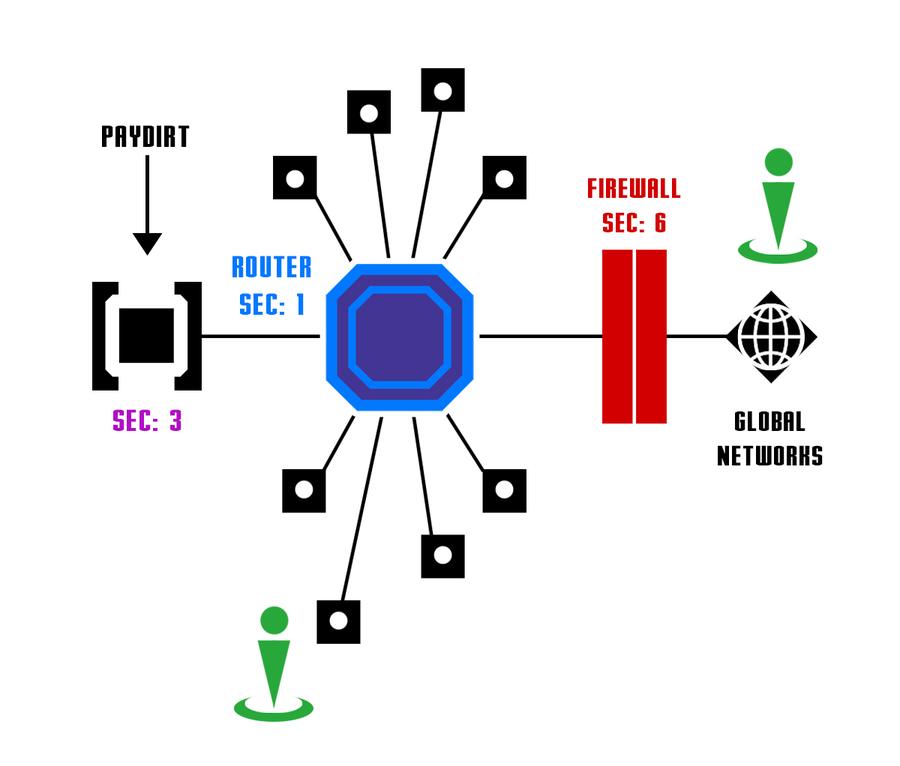
If a hacker is able to get into a location that has more access, such as the office or the server farm, he can get a leg up. Often, there are fewer security measures protecting access from inside a trusted location compared to the world at large. If the system being targeted is behind a firewall, then physically intruding allows a hacker to bypass the SEC of that firewall entirely. Note that many computer systems have multiple layers of firewall; different areas of the physical building may get through different layers of this security system.
A character that is physically near such an access point may roll an INT + Computer (Hardware) test to try to tap into connections, such as networking cables running between secure areas, which may be running through less secure areas. Succeeding at this test gains the same benefits as intruding into the secured area. The threshold for this test may be anywhere from 2 to 6 depending on the amount of security present in the building in question, as the process is likely to be very visible. It is recommended that the GM require the player or team to roleplay the process of getting in and covering or disguising the tap into the network.
Escalating Privileges
Having access to the machine is not enough on its own; the hacker must then convince the target system that she can be trusted. This part of the process involves an INT + Computer (Hacking) test; the threshold depends on the target's Hacking Reaction Mode, and any surplus hits are banked in the Hack Bank, which may be spent to perform actions with the hacked Core. The escalation test may be repeated as often as desired, but keep in mind that each time it is, a Glitch Test is rolled using the Response Bank as the GR. (Additionally, the Response Bank may be getting increased with each escalation if the Core has Active Defense enabled.)
Hacking Reaction Modes
Cores respond to attempts at hacking in different ways, depending on their usage and the level of security and convenience required. The key thing to note is that the system's legitimate owner is affected by these modes as well; the more convenient the mode is, the less secure it is. A Core may have one of three modes enabled, with an optional "Active Defense" mode on top of it. Changing between them requires a Digital Macro action.
Open
If the Core is Open, it is easy to use, requiring no IP (by anyone) to use it. Its effective SEC is 0, and it will make no attempt to defend itself from hacking attempts. This mode may be a response to an expected DoS attack, or the result of an incompetent sysadmin (or an owner who refused to hire one). Sometimes Cores are open by design (for example, smart light bulbs in low-priority areas are sometimes unsecured so that anyone nearby may turn them on.) Of course, a hacker may switch a Core's mode to Open as his first order of business, making his job a lot easier.
Standard
Most Cores a hacker will encounter in the wild will be in Standard reaction mode. The Core takes no IP to operate. When a Core in Standard mode is the target of a hacking attempt, it always uses 1 IP of its own Bank to defend itself; the threshold when doing so is its SEC. (If it has no IP, it is effectively Open.) Standard mode devices are particularly vulnerable to DDoS attacks.
Lockdown
A computer that is expected to be attacked is likely to be set to Lockdown mode. This mode requires a certain amount of competency to set up, so the first time a user puts her equipment in Lockdown, she will roll INT + Computer (Security Systems). This result is stored in the Core's Lockdown Attribute, or LKD. If a glitch is rolled on this test, the Core is (unbeknownst to the owner) actually set to Open mode, and LKD's value is ignored. This Attribute may only be rerolled by the same character if that character has improved their Computer Skill or learned the Security Systems Specialization; otherwise, it may only be rerolled by a different character (for example, a competent sysadmin).
Working with a Core in Lockdown is inconvenient. Taking any action with the Core first requires a Digital Macro action to temporarily unlock it, causing a character to have to Blitz another Macro to do what he wants to do. After the action is taken, the Core will lock itself down again (unless the action was to change the Reaction Mode). It is possible to have peripheral Cores in Lockdown mode while a character's main Core is in a different mode; if your smartgun is in Lockdown, for example, you might have a Pack Core (whose SEC may be higher) that is capable of unlocking the gun and performing actions. This is colloquially referred to as having one device "slaved" to another. In this scenario, operating the smartgun requires only the single Digital Macro, while the gun gets the security of Lockdown mode. Of course, this means that if the master node (in this example, the Pack Core) is hacked, then anything slaved to it would also be hacked. If a Core is in the Lockdown mode, it can continue to run its own programs autonomously without penalty. An office security system will continue to record cameras and manage the door locks, for example. It will only need to be unlocked when the user needs to access the system.
When attempting to escalate permissions on a Core in Lockdown mode, the test's base threshold is the Core's SEC. If the attack does exceed this threshold, a Core in Lockdown will automatically spend any IP it has to increase the threshold by the LKD per IP spent, until either the Core is out of IP or the attack has failed. For this reason, a low Lockdown Attribute is often worse than not having Lockdown set at all, as it will quickly burn through the Core's entire ability to act.
Active Defense
An additional modification over one of the other modes (typically Lockdown). On a Core's next action after a hacking attempt, it uses 1 IP to make a Digital Perception test (for Cores, the pool for this test is CPU + SEC) to determine the source of the attack, adding its hits to the hacker's Response Bank.
DoS Attack
A Denial-of-Service attack involves many small, insignificant hack attempts intended to wear down the defenses of a Core and cripple its actions. This is mostly useful when the targeted Core is in Standard reaction mode.
Because a DoS attack cripples the attacker exactly as much as it cripples the defender, it is standard practice to attack from many computers against one, a Distributed Denial-of-Service attack, or DDoS. A typical strategy is to use a zombie network to take down the defenses, then come in afterwards to handle the actual hack job.
An owner of a Core will usually know right away that a DoS attack is happening; these are not subtle. For a normal DoS attack, the Response Bank is increased by 1 for every attack the Core makes. While the victim of a DDoS will immediately be aware that an attack is happening, the sheer volume of traffic in a DDoS serves to mask the real source of the attack, and thus, a DDoS does not increase the Response Bank.
When using a DoS attack, every Core involved will be expected to use its full IP refresh rate (the first number in the Bank Attribute) every turn to attack the target. If the target is in Standard Raction Mode, simply reduce the target's IP Bank by this value. It usually takes only a handful of Cores attacking a single machine in Standard mode to reduce its IP to nothing, at which point a hacker may easily exploit it with much less resistance.
If the target is in Lockdown mode, a Core attempting to DoS the target does not force an IP expenditure unless the attacking Core's CPU Attribute is equal or greater than the target's SEC. If so, the targeted Core will spend 1 IP as normal. Thus, performing a DDoS against a target in Lockdown generally requires high-end devices, and many of them.
Social Engineering Bonuses
There's a saying in computer security—"The weakest link is the user". People often choose bad passwords so that they can remember them, install sketchy software because it looks like a good deal to them, or give out sensitive information to someone who claims to be their sysadmin. Often, gaining access to a secured system is as simple as exploiting this weak link. Social Engineering is the practice of psychological manipulation of the people who have access to the system an intruder wants access to.
Social engineering is primarily used for slower hack jobs with bigger payouts; high-speed combat hacking, for example, is not a suitable time to use social engineering. The proper Skill to be used is dependent on context, but the proper Attribute is always MAN. Social engineering may be done in person, generally requiring the Influence (Social Engineering) Skill Specialization. It may be done virtually, which may require the Art (Forgery) Skill instead. In any case, the result of this roll is added to the Hack Bank; note that the hacker will still need to gain access to the Core through other means before being able to use these hits.
If the hacker uses the bonus from social engineering to escalate privileges, then he cannot gain more access than the target had. Only one social engineering bonus may apply to any given hacking attempt. Glitches during a social engineering test should expose the hacker personally, not merely their Core's address or location.
Hacking by Proxy
Standard practice for hackers is to work behind a proxy. A Proxy is another computer, controlled by the hacker, through which the attack is conducted. The hacker may choose to route his attacks through any number of Proxies he wishes, but at a cost—every Proxy subtracts one from his Hacking dice pool, or two if the proxy has a Network rating of just 1. Additionally, the hacker must either own (or pwn) the proxy, or must use 5 hits from the Hack Bank of that device. In exchange, finding the true source of an attack requires one additional Digital Awareness hit to be spent for each Proxy; and if the perceiver cannot spend this amount, then the attack appears to be coming from one of the Proxies.
The specific devices that comprise a hacker's Proxies are usually relatively unimportant and anonymous. A hacker may, for example, bring three Cores with him, chaining from one to the next, and if one gets targeted or disabled, he switches to the next. A hacker operating remotely is likely to have swarms of slave machines ready to go, which he can choose from when setting up Proxies. Assuming the ownership of these devices is established before the hack takes place, the hacker can simply declare that he is acting through a particular number of proxies and no further information is required. However, acting through anonymous proxies that are not legitimately owned by the hacker incurs a Glitch Risk of 1 for each such proxy.
However, a Proxy may also be a specified Core. If a particular Core is owned or pwned by the hacker, that device may be used as a Proxy. If this is the case, and the hacking target's Perception test does not get enough hits to find the true source of the attack, then the attack will appear to be coming from this incorrect source. Hacking via Proxies may thereby be used to sow distrust between enemy teams—and it may be good reason to insist that your teammates all have properly secured Cores. It may also be used as a show of domination by the hacker—having an enemy see that a hacking attempt originated from the embedded device within their gun is unsettling at the very least.
If a hacker glitches on a test that he is conducting through a Proxy (especially an anonymous one that may not legitimately belong to him), then this provides some additional options for things that can go wrong. Perhaps one of the Cores he was using as a Proxy happens to belong to the wrong person, who noticed the hack (or wants revenge after the main hacking target mistakes them for the hacker). Or perhaps one of these proxies has a hidden security response or happens to be patrolled by network security at the moment the hacker is routing his attack through it.
Objective
Once a hacker is into the system, she will want to perform some sort of action. Any kind of action on a hacked device requires the hacker to spend points from the Hack Bank. (The number spend for each action is the number in parentheses.) If the Core has no IP left when the action is forced (as is often the case for Core in Standard or Lockdown mode), the forced action will be the first thing to happen on its next turn, and it will reserve enough of its IP (not spending it on defense from an ongoing DDoS, for example) to carry out the forced action. For the hacker, these actions are treated as Digital Macros in terms of IP spent.
| Action | Hack Bank cost | Response |
|---|---|---|
| Breach | 1 | +1 |
| Spoof | 2 | +1 |
| Hack | 5 | +2 |
| Pwn | 8 | +5 |
The first time a hacker attempts to perform any of these actions, the Core's rightful owner may make a PER + Computer (Security Systems) test. These hits are added to the Response Bank.
Breach—Read-only Actions
The simplest thing to do is to read or gain a copy of data on the target Core. This includes copying files as well as tapping into existing data feeds (though not turning on any feeds that are not already active). This action will most likely involve a PER + Computer (Data Search) test to find the appropriate data. If the hacker has direct physical, wired, or wireless access, it is generally possible to simply grab everything and search through it later.
Spoof—Force User Actions
The next thing a hacker can do is to force an action as if the hacker was a regular user. The possible uses of this are too numerous to list, but by and large, any kind of alteration to data on the Core or attached devices will probably fall under this category, in addition to giving commands to any slaved Cores. Common uses for this include modifying data, turning linked devices on or off, and controlling drones' actions. If the action would normally require a test on the part of the owner, it would require the same test and IP cost by the hacker.
Hack—Forced Sysadmin Actions
Actions that the system administrator would perform are often the most useful for continued actions. This allows the hacker to continue her attack on the system unimpeded. Examples of this kind of action include:
- Change hacking reaction mode (Open/Standard/Lockdown)
- Enable/Disable Active Defense
- Wipe device
- Shut down Core (note: shutting down attached devices is a Spoof action)
- Enable/disable wireless
- Use this Core as a proxy
- Perform any of the above actions to any slaved Cores
Pwn—Own the System
A character may attempt to 'pwn' (pronounced simply "own") a device—to change its master administration access, denying its legitimate owner access. Once this is accomplished, there are three options for the victim: restore from a backup (losing some data), reformat the device (starting over from factory settings and losing all data), or try to hack it back (using the exact same process the hacker used in the first place). Many professional operations have multiple redundant backups, and once it is clear that a system has been pwned, will not hesitate to restore from a backup; this process can take anywhere from a few minutes to a day, based on the overall complexity of the system and the competence of the sysadmin.
A Core's legitimate owner will usually know instantly that his Core has been pwned the next time he tries to use it. Many owners will shut down the Core at that point and reformat it, though some get more creative.
Effect of TLs on Cores
The CPU Tech Level of a culture that produces a given Core determines the types of Cores and UIs that are available, of course. However, it also has an effect on certain aspects of using the Cores.
The effective Storage is directly modified by the TL. The CPU Attribute may be modified by the TL in certain situations, particularly when doing raw processing such as altering videos or analyzing scan data for patterns.
Other Core Attributes are not affected by TL directly. Although the Cores themselves are getting more powerful, this is counterbalanced by other things that are increased as well. A higher-TL Core has more power but it is spending more of that power on things that are now standard, such as increased security required to counter the also-more-powerful Cores that would now be trying to hack into it, or (generally non-optional) graphics that are much fancier than they were a decade ago.
If a hacker using equipment from one culture is attacking a Core from a different culture, the TLs of these two may be different. In this situation, the difference in TLs is applied as a dice pool modifier in favor of the Core with the higher TL.
Response Bank and Consequences
The Response Bank is increased by most hacking actions as described throughout this chapter. It represents the level of awareness of the hacker's actions. The hacker typically should not be aware of the value of the Response Bank. Once the Response Bank's value exceeds that of the Hack Bank (including when this happens because the Hack Bank's hits have been spent), the hacker's illicit acitivities have been noticed and traced back to their source.
The environment and situation determine both who has discovered the hacker and what their reaction will be. The most common reaction from normal users is to simply cut off the hacker's connection to the target. If it is the target that noticed the activity, they are likely to shut off their own network connection. If the local network authorities have noticed the activity, whoever they may be, then it's more likely that the hacker's own connection will be forcibly disconnected or jammed.
More vicious responses to being hacked are uncommon, but some high security environments will employ these tactics. The authorities may attempt to locate the hacker physically as well, particularly if the hacker's activities were not merely inconvenient but also illegal, and may send security forces in the real world to apprehend the offender. The victim may attempt hacking the hacker's device in retribution, possibly damaging the hacker's device or even the hacker himself if a neural interface exists.
If the hacker feels they are nearing detection, they can choose to disconnect and zero out all hits from both the Hack Bank and the Response Bank at any time. If a response hasn't yet been triggered, there is no consequence to this. If the hacker was detected before this, the target remains alert and the Response Bank will begin at a value of the GM's choosing should the hacker attempt to hack the same target again.
Virtual Assistants
A Virtual Assistant is a piece of software designed to interact with its users and perform basic tasks. The earliest assistants were not good for much more than setting reminders or checking the weather, but as time progressed they became capable of more and more. Assistant software at the point of CPU TL 7 is capable of understanding and carrying out complex requests, and even overcoming straightforward obstacles in carrying out these requests.
Creating a Virtual Assistant
Every Assistant has a Rating, determined when it is programmed. A single purpose Assistant software may be programmed by rolling INT + Computer (Programming); the hits rolled are banked, and this bank is used as the Assistant's Rating, usable for only one situation for which it has been designed. Writing such a program takes approximately one hour.
General-purpose Assistant software, which may be copied and used for multiple purposes, is much more difficult to write, and is usually purchased from expert programmers instead. The maximum Rating available for purchase is in a given culture is that culture's CPU TL—3.
| Rating | Threshold | Base Cost |
| 1 | 1 | 100 |
| 2 | 3 | 400 |
| 3 | 6 | 900 |
| 4 | 10 | 1600 |
| 5 | 15 | 2500 |
| 6 | 21 | 3600 |
Creating a general-purpose Assistant is intensive work, requiring repeated tests, each test involving one week's work. First, the programmer selects the desired Rating of the Assistant software; the threshold (from the table above) is the total number of hits the programmer will ultimately need to obtain. The dice pool for each test is INT + Computer (Programming)—Bank. The Bank begins at 0, and the hits from each test are cumulatively added to the Bank; progress will slow down as the project proceeds.
Once the Assistant is created, its code may be stored, copied, used, and sold without limitation.
Virtual Assistant Skills
When an Assistant is created, the programmer may include levels in Skills that the Assistant may use. The total ratings of these Skills may not add up to be higher than its Rating, and each Skill may not exceed the programmer's own level of that same Skill (characters assisting the programming process may not contribute towards this). Most common is the Computer Skill, but Art and Influence are also known to appear in these Assistants. Skills that aren't useful in the digital world (such as Survival) may be included in order to assist characters performing these Skills in the real world (in the case of Survival, for example, by highlighting poisonous berries or helping identify clean water sources).
Using a Virtual Assistant
Once the user has a Virtual Assistant available, the Assistant may be set on tasks independently or may assist a character directly. When on independent tasks, an Assistant uses its Skills by using its Rating in place of the relevant Attribute, and suffers a +1 GR to all actions (with a glitch generally meaning the Assistant has encountered a scenario its programming couldn't anticipate). Assistants can use their Skills to assist characters with many tasks, and when doing so, do not take the GR as they do when acting independently.
Technoshamans
Rising around the turn of the 22nd century, Technoshamans represent a new way to use technology to organize and arrange the livelihood of its participants. Technoshamans rely heavily on a distributed network algorithm in place of any sort of Human governance.
The Technoshamanic Interface
Users and Agents of the network most commonly interact with it via AR/VR goggles or contacts. When used this way, the technoshamanic interface presents itself to the users as virtual floating runes and icons which can be interacted with directly using the Shamanic language. These runes are only visible to wearers of AR/VR equipment, and even then only those for which the technoshaman has chosen to share (usually close friends or those he is working closely with). To everyone else, the user appears to be making nonsensical hand gestures in the air, not unlike a fantastical magician casting a spell. These gestures may be data input, or may be invocations to control devices and virtual entities.
The Network Algorithm
Technoshamanic communities are run by the network algorithm. This distributed algorithm may call upon any member at any time to perform a mission vital to the network. The algorithm determines its own needs and assigns its resources as it deems necessary.
It's important to note that the network algorithm is not an artificial intelligence. The network is heavily dependent on the sentient beings it governs to make decisions about how to handle problems, forming an effective symbiotic relationship with biological life forms.
The Shamanic Language
In addition to being more advanced than the general population's computer technology, the Cores of the Technoshaman culture are used very differently than other computers. This is represented with the Shamanic language, which is a constructed language exclusively designed for Core interaction. The Shamanic language is treated much like a verbal language—it is considered to be part of the European language family, and the network of each world (such as Earth) has a dialect. Someone unfamiliar with the Shamanic languge will find these Cores difficult if not impossible to use. (For reference, all tests using a language the character does not know have their dice pools halved, and the GR of any dependent action is increased by 3.) Technoshamans attempting to use non-Shamanic Cores find the process cumbersome, and should be considered to be defaulting on the relevant Skill even if they have it.
The Technoshamanic Interface avoids the user interface paradigms of other Cores, such as windows, buttons, and pages of text. Though the Cores are capable of emulating this to a degree when needed (such as when accessing data via the network that is only available in these antiquated forms), the two primary means of using the technoshamanic network, the neural interface and augmented reality, both use the Shamanic visual language throughout.
Commands are given to Shamanic Cores in the Shamanic Language, a means of communication that is compatible with (and easily converted between) hand motions, visual diagrams, and neural patterns. Between the three, the language is usable with minimal translation by any species. Few if any know Shamanic as their only language, and though it can be used for communication from person to person, this is not its intended purpose and most Technoshamans use their native language most of the time to communicate with each other. The language is explicitly logical and is designed to be syntactically unambiguous, and thus can be used to efficiently and precisely control a Core.
Network Spirits
The shamanic network hosts a number of virtual avatars known as network spirits. Spirits are able to act independently, with varying levels of freedom and intelligence, although none of them rise to the level of intelligence that could be considered AI. They exist solely in virtual space, able to be seen by all users of the network, but no one outside it. These spirits exist to serve Agents and Acolytes of the network, using their invoker's own influence and power in the network to affect systems and control devices. Not being sentient, spirits have no concepts of abuse or mistreatment, and have no reservations about being sent on suicide missions. Their data can be copied as needed.
Network spirits are invoked using INT + Computer (Shamanic Compilation), and are used in the same way as standard Assistant software. Network spirits do not suffer from the same GR as Assistants do when operating independently.
The Upper World
While Assistants tend to be dry, dull, and matter of fact in the way they operate (except when specifically programmed not to be, such as with the Influence Skill), network spirits have much more variety and personality. When a technoshaman compiles a spirit, a significant piece of the code (most of the personality of the spirit) comes from a database of interaction codebases, referred to in technoshamanic lore as "the upper world". Unlike Assistant software, these interaction codebases are persistent; when a single-purpose network spirit is finished with its task, its personality returns to the upper world, and it retains its identity as well as much of its memory of its past self. If a spirit was handling sensitive information, the invoker may wipe this information before it returns to the upper world. General-purpose spirits do not return to the upper world, but will have the experience of past missions.
Because spirits are persistent, technoshamans have a practice of treating their spirits with respect. While most hackers will simply order their Assistants around, technoshamans tend to make requests of their spirits instead. Technoshamans will sometimes invoke the same spirit again in new incarnations, and while spirits will always obey their invoker, they can be much less pleasant to be around when they have been mistreated in the past.